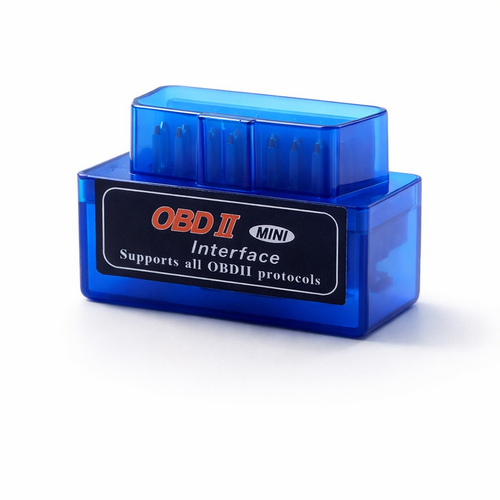
Frequently Asked Questions About the ELM327 Mini V1.5 OBD2 Bluetooth Interface Auto Car Scanner
The ELM327 Mini V1.5 is a compact diagnostic adapter for reading data from vehicle electronic systems through the OBD2 socket. It is most often purchased for independent engine fault checks, viewing sensor readings, and clearing Check Engine without a service visit.
User experience indicates that this scanner generally works with an Android smartphone and may also be used with Windows and some other platforms if the particular device version is suitable and a compatible application is installed. Connection uses Bluetooth, with Wi-Fi versions also available.
The device is fairly simple to use: insert the adapter into the diagnostic socket, enable Bluetooth on the phone, find the device in the connection list, enter the standard password if required, and then connect through the diagnostic program. Some users need several initial connection attempts because much depends on the application and particular vehicle.
Frequently mentioned tasks include reading diagnostic trouble codes, deleting stored faults, viewing engine speed, coolant temperature, vehicle speed, engine load, throttle position, mass airflow, fuel pressure, and other parameters supported by the vehicle ECU.
Users install Torque Pro, OBD Auto Doctor, Open Diag, CVTz50, Car Scanner, and other applications. Universal programs suit basic diagnostics, while specialized ones serve particular makes and modules. Sometimes the application determines whether the required parameters or only general fault codes are visible.
Reviews indicate that the adapter often pays for itself very quickly. Purchased for several hundred rubles, it is then used on the owner's cars, friends' cars, and as a standby roadside tool. It does not repair the vehicle itself, but quickly indicates the direction of investigation: misfires, alternator problems, and hidden faults not always apparent without scanning.
The device is small and lightweight, and storage is generally straightforward: it is simply kept in the glove compartment. Frequently mentioned drawbacks include adapter version confusion, software that is not always clear, English parameter labels, and the fact that different vehicles do not provide identical data sets.
ELM327 Mini V1.5 OBD2 Bluetooth Interface Auto Car Scanner Specifications
Adapter version: ELM327 Mini V1.5
Device type: automotive OBD2 diagnostic scanner
Vehicle connection: OBD2 socket
Wireless connection: Bluetooth
Additional versions: Wi-Fi versions are available
Compatible platforms: Android, Windows, Symbian
Smartphone support: yes
PC support: yes, with compatible software
Main functions: reading fault codes, clearing faults, viewing current ECU parameters
Displayed parameters: engine speed, coolant temperature, vehicle speed, engine load, throttle position, mass airflow, fuel pressure, and other supported PIDs
Applications: Torque Pro, OBD Auto Doctor, Open Diag, CVTz50, Car Scanner, and other compatible software
Power supply: vehicle diagnostic socket
Vehicle compatibility: depends on the particular vehicle's OBD2 support
Approximate price according to reviews: approximately 262-800 rubles
Form factor: compact mini adapter
General Information
What is the ELM327 Mini V1.5 OBD2 used for?
The ELM327 Mini V1.5 OBD2 is a portable automotive scanner for vehicle diagnostics through the diagnostic socket. It is used to read sensor parameters, view and clear faults, monitor current engine and other system readings, and track vehicle condition in real time.
What can the ELM327 Mini V1.5 OBD2 do?
The scanner supports the main diagnostic functions:
- reading fault codes and their explanations;
- erasing faults, including switching off the MIL - Check Engine indicator;
- viewing engine speed;
- monitoring engine load;
- monitoring coolant temperature;
- viewing vehicle speed;
- monitoring fuel consumption, including over particular distances;
- viewing absolute air pressure;
- monitoring intake air temperature;
- viewing mass airflow;
- monitoring throttle position;
- viewing oxygen sensor data;
- monitoring fuel pressure;
- viewing voltage in vehicle circuits.
Can vehicle data be viewed in real time?
Yes. After connecting the ELM327 Mini V1.5 OBD2 to the vehicle and phone, engine and other system parameters can be monitored in real time. Data appears in the smartphone application or on a computer if compatible software is used.
Can the adapter be used as an additional instrument panel?
Yes. With compatible software, a smartphone can serve as a HUD, a screen displaying driving and engine operation parameters. This mode is particularly convenient in vehicles without a standard onboard computer.
.Compatibility and Connection
Which devices does the adapter work with?
The ELM327 Mini V1.5 OBD2 is used with smartphones, tablets, and computers. Operation with Android, Windows, Symbian, Windows Phone, and iPhone with a suitable application is confirmed. The connection method depends on adapter version, through Bluetooth or Wi-Fi.
How is the ELM327 Mini V1.5 OBD2 connected to a vehicle and phone?
Connect in the following sequence:
- Insert the adapter into the vehicle diagnostic socket.
- Check that the red indicator on the enclosure illuminates.
- Enable Bluetooth connectivity or Wi-Fi on the phone according to adapter version.
- Find the OBDII device. Its name may differ.
- Connect to the adapter. If a PIN code is requested, 1234 or 1111 is generally used.
- Open the installed application.
- Select the connection section in application settings and connect the adapter.
Diagnostics and parameter viewing can then begin.
What should be done if initial connection is difficult?
Initial connection may involve difficulty finding the device, selecting the communication mode, or configuring the application. Recheck the connection method, code 1234 or 1111, program connection settings, and application compatibility with the vehicle. If connection fails, compare the setup sequence with a step-by-step video guide.
Where is the connection socket generally located?
The diagnostic socket is generally behind the vehicle glove compartment or near that area. The exact location depends on the particular vehicle construction.
Is an OBD2 adapter suitable for every vehicle?
The adapter is not suitable for every vehicle without exception. It is designed for vehicles supporting OBD II. Compatibility is possible for most vehicles manufactured since the late 90s, but confirm that the particular vehicle actually uses this specification before purchase. Some cases require another diagnostic standard.
With which vehicles is compatibility confirmed?
ELM327 Mini V1.5 OBD2 operation is confirmed with the following vehicles:
- Lada Granta;
- Hyundai Accent;
- Renault Logan;
- Kia Rio;
- Ford Fusion;
- Daewoo Matiz;
- Lada Priora;
- Chery QQ6 (S21);
- Audi A6 Allroad;
- Opel Meriva.
On these vehicles, it was used to read and clear basic faults and view current parameters.
.Is there a difference between versions 1.5 and 2.1?
The following ELM327 version compatibility assessments occur:
- V1.5 is considered the main version and recommended for wider compatibility;
- one assessment considers V2.1 unsuitable and specifically recommends V1.5;
- another considers V2.1 a weaker version;
- an opinion also states that V1.5 is suitable for Russian vehicles.
When purchasing an ELM327 Mini V1.5 OBD2 for maximum compatibility, specifically choose version 1.5.
Applications and Software
Are special programs required?
Yes. An application on a phone, tablet, or computer is required. Universal programs generally read basic ECU parameters, display sensor data, and erase faults. Specialized programs are designed for particular vehicle makes and may provide additional functions, including checking and configuring CVTs, hybrid systems, automatic transmission parameters, and airbags.
Which applications are used with the ELM327 Mini V1.5 OBD2?
Different programs are used with the adapter. The following are mentioned:
- OBD Auto Doctor;
- Car Scaner;
- CVTz50;
- Open Diag;
- Olivo;
- Torque Pro;
- HobDrive.
Program selection depends on device operating system, vehicle make, and required functions.
Should software be selected for the particular vehicle?
Yes. Not all programs work equally well with every vehicle and adapter. Universal applications suit some cars, while others require make-specific software. Selecting software for Russian vehicles may be more difficult.
Can the adapter be used with a computer?
Yes. The ELM327 Mini V1.5 OBD2 can connect to a computer as well as a smartphone if a compatible program and driver are available. Operation with CVTz50 is confirmed. A mini disc with software or drivers may be included, but using it is not mandatory.
Is the supplied software disc required?
A mini disc may be supplied. It is intended to install drivers or programs for computer operation. The adapter can also be used without the disc if the required software is installed separately. Use of the supplied media is optional.
.Diagnostics and Practical Applications
Can faults be read and cleared?
Yes. The ELM327 Mini V1.5 OBD2 supports reading fault codes, explaining them, and deleting them from memory. This is one of its main functions. If the fault has been repaired, the code can be erased through the application. If the cause remains, the fault and dashboard indication may return.
Does the adapter show only the fault code or also an explanation?
The adapter can display both the code and its explanation. Depending on the software, probable troubleshooting areas may also appear.
Does the ELM327 Mini V1.5 OBD2 help with actual repairs?
Yes. It has been used to locate intake air leaks, identify faulty electronic components, and diagnose misfires. One example records scanning that showed no ignition in cylinder 4, after which a faulty ignition coil was identified. It was also used to clear a fault after drying coils flooded during engine washing.
Can hidden faults be detected when the dashboard indicator is off?
Yes. The ELM327 Mini V1.5 OBD2 can detect stored faults even when the dashboard Check Engine indicator is inactive.
Can individual vehicle functions be disabled through compatible software?
Yes, if supported by the vehicle electronics and selected program. Disabling the automatic headlamp washer through CVTz50 is documented.
Are there limitations to adapter functionality?
ELM327 Mini V1.5 OBD2 functionality depends on the vehicle onboard computer and software capabilities as well as the adapter itself. If a particular vehicle system does not support the required parameter or command, the adapter cannot provide that function.
Can trip and parameter logs be recorded?
Yes. A compatible application can record data as trip journals and parameter logs.
Operation
Is the ELM327 Mini V1.5 OBD2 difficult to use?
After initial setup, the adapter is generally easy to use. Main actions are connecting it to the vehicle socket, installing an application, configuring the connection, and selecting the required diagnostic mode.
Is the adapter suitable for regular use during trips?
Yes. The ELM327 Mini V1.5 OBD2 is used for regular vehicle condition monitoring during trips as well as one-time checks.
Are there disadvantages to using the adapter?
The main drawback concerns software. Stable operation requires selecting suitable software, and some parameters and labels may appear in English.
Related articles:
Rokodil ScanX Automotive Scanner FAQ
ELM327 Mini V1.5 OBD2 Bluetooth Automotive Scanner Review
EAFC Jump Starter FAQ
Goodyear CH-4A Smart Battery Charger FAQ
Lunfei 1,5 kW PH1500 Engine Preheater FAQ
SEVERMAX 5000-2 MINI Engine Preheater FAQ
Wi-Fi Combination Devices: Neoline DeepScan WiFi, iBOX RoadScan 4K WiFi GPS Dual, and iBOX Evo LaserVision WiFi Signature Dual
| Car Alarm User Manuals |
| TPMS Tire Pressure Monitoring System Manuals |
| Video Recorder and Voice Recorder User Manuals |
| Charger Instructions |