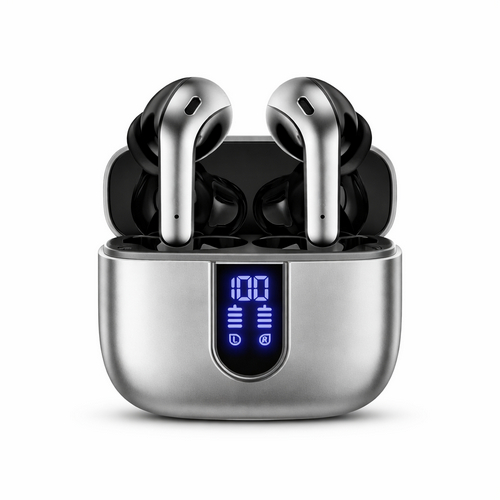
Breeks X08 Frequently Asked Questions - Connection, Setup, and Operation
Breeks X08 Technical Specifications
- Model: Breeks_X08
- Colour: black
- Earphone type: canal, in-ear
- Connection type: wireless
- Bluetooth version: 5.3
- Operating range: 10-15 m
- Protection rating: IPX5
- Diaphragm diameter: 13 mm
- Minimum frequency: 20 Hz
- Acoustic design: stereo, hi-fi
- Case battery capacity: 370 mAh
- Charging time: up to 1 hour
- Charging connector: USB Type-C
- Housing material: ABS plastic
- Warranty: 1 year
- Weight without packaging: 42 g
- Weight with packaging: 90 g
- Package dimensions: 10x5x15 cm
- Country of manufacture: China
- Package contents: box - 1; earbuds - 2; cable - 1; interchangeable ear tips - 4; English instructions - 1; charging case - 1
Do Breeks X08 wireless earbuds support Bluetooth 4.2 and 5.0?
Yes, the model is compatible with Bluetooth 4.2, 5.0, and later versions. This provides a stable connection with modern mobile devices, laptops, and televisions.
What is the wireless connection range?
Stable operation is provided at distances of up to 10 m in the absence of physical obstacles and interference.
Is the AAC codec supported?
Yes, AAC codec support is provided. Actual audio transmission quality depends on the compatibility and settings of the connected device.
Which connector is used to charge the case?
A USB Type-C connector is used for charging.
Is wireless charging supported?
No, charging is performed exclusively through a wired connection to the USB Type-C port.
Can only one earbud be used?
Yes, each Breeks X08 earbud can operate independently. One earbud can remain in the case while the other is used. Simultaneous connection to two different devices is not supported.
Is Multipoint (simultaneous connection to two devices) supported?
No, the Multipoint function is absent.
Is active noise cancellation available?
Yes, the noise cancellation system activates automatically when the earbuds are switched on and connected to a device. Separate activation or deactivation is not provided.
Is transparency mode provided?
No, this model does not have transparency mode.
.Is a gaming mode available?
A dedicated gaming mode is not provided. Noticeable audio latency may occur in fast-paced games, depending on the device and Bluetooth version.
Is an in-ear detection sensor provided?
No, automatic pausing when an earbud is removed is not supported.
Is a geolocation function provided to find a lost earbud?
No, there is no built-in location function.
Is a proprietary application available for configuration?
A proprietary application is not provided. If necessary, third-party equalisers compatible with the device's operating system can be used.
Are Breeks X08 earbuds compatible with Samsung, iPhone, Xiaomi, Honor, Tecno, Infinix, Realme, Poco, and other phones?
Yes, Breeks X08 wireless earbuds are compatible with all Bluetooth-enabled devices, including Android and iOS smartphones, laptops, and televisions with a Bluetooth module.
Which ear tips are installed by default?
Size M ear tips are installed as standard. Additional sizes are included to obtain an optimal fit.
Will the earbuds fit a child aged 9-10?
The fit depends on the individual's outer ear size. The model may be too large for small ears. Trying them on beforehand is recommended.
Is a charging adapter included?
The package includes a USB-A - USB Type-C cable. A mains power adapter is not included.
Are the earbuds or case sold separately?
No, they are supplied as a set. Separate sale of the earbuds or case is not provided.
Is a cover available for the Breeks X08 model?
A branded silicone cover is provided (item number 247847419). Availability depends on stock. Covers for other models, including AirPods, do not fit because of the case's specific shape.
.How are the controls operated?
The controls are touch-sensitive. Three quick taps on the right earbud increase the volume. Double-tapping the right earbud selects the next track. Double-tapping the left earbud selects the previous track. A detailed diagram is provided in the instructions.
Can touch controls be disabled?
No, disabling touch controls is not supported.
Does the touch sensor work with gloves?
No, the sensor responds only to direct contact with a finger.
How do the indicators and case display work?
The indicator lights flash until connection to a device is established. After a successful connection, they turn off. The case screen displays the case battery level, while the side indicators show the earbud charging progress.
How do I connect the earbuds to a phone?
For initial connection: 1) remove one earbud from the case; 2) close the case; 3) connect through the device's Bluetooth menu; 4) remove the second earbud for automatic synchronisation.
How do I turn off the earbuds and case?
The earbuds turn off automatically when placed in the case. To switch them off manually, hold the touch-sensitive area for approximately 5 seconds. The case cannot be switched off manually - the display turns off automatically after charging is complete.
Can the case be charged with the earbuds inside?
Yes, charging is permitted both with and without the earbuds installed.
Which charging adapter is recommended?
A power adapter with an output current of 1 A is recommended to extend battery service life. Adapters rated at 2-3 A may be used, but at high power charging may stop automatically at approximately 80%.
Why may charging stop at 80%?
The built-in battery protection activates when a powerful power adapter is used. A 1 A adapter or a computer USB port is recommended for correct charging.
How should the first charge be performed correctly?
Fully charging the device to 100% is recommended. At 80-90%, a delay of 15-20 minutes may occur - this is normal operation of the charge controller.
Why does the battery level fall rapidly during initial use?
Accelerated discharge may occur during the first operating cycle. The parameters stabilise after a complete charging and discharging cycle.
.Will people nearby hear the music being played?
Audibility depends on how closely the ear tips fit and the selected volume. With correctly selected ear tips, sound leakage is minimal.
Do the earbuds work underwater?
No, underwater use is not permitted. Protection is provided only against raindrops and perspiration.
Is a built-in microphone provided for calls?
Yes, a built-in microphone is provided. Voice transmission quality depends on the ambient noise level and operating conditions.
Is there a warranty for Breeks X08?
The warranty period is 1 year, provided that the operating conditions specified in the user manual are observed.
How does the X08 model differ from X15?
The difference lies in the external design of the case. The models have identical functionality.
Key numerical specifications of the model
Bluetooth versions: 4.2 and later. Operating range: up to 10 m. Recommended charging current: 1 A. Permissible adapter current: 2-3 A. Possible delay upon reaching 80-90% charge: 15-20 minutes. Warranty: 1 year.
Related articles:
Budget Wireless Earbuds: Breeks X08 Wireless Earbuds, IOTO Buds 2, PRO5S Wireless Earbuds
IOTO Buds 2 Wireless Earbuds FAQ
Xiaomi Redmi Buds 6 Play Wireless Earbuds FAQ
JBL Tour Pro 5 FAQ - wireless earbuds with a display on the case
CAT ear STN-28 cat-ear headphones FAQ
HUAWEI FreeBuds 5i Earbuds FAQ
HUAWEI FreeBuds SE 2 FAQ
KABIX U5 Earbuds FAQ (Frequently Asked Questions)
Kabix B20 Bluetooth Headset FAQ
| Mi Sports Bluetooth Manual |
| Xiaomi MI True Wireless Basic Manual |
| Xiaomi Redmi Buds 4 Instructions |
| JBL WAVE FLEX Earbuds Manual |
| HONOR Choice EarBuds X5 Headphones User Manual |
| Realme Buds T110 Manual |