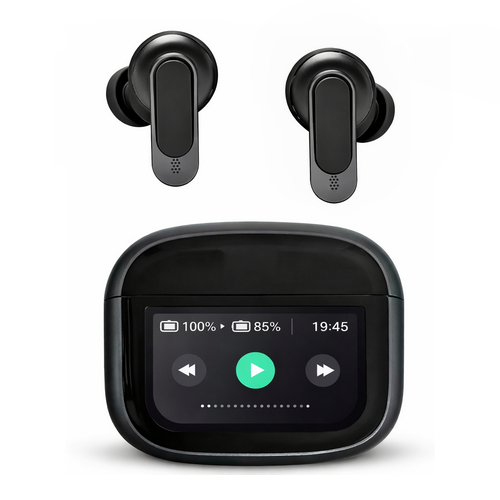
JBL Tour Pro 5 Frequently Asked Questions
JBL Tour Pro 5 Technical Specifications
Model: JBL Tour Pro 5
Colour: black
Earphone type: in-ear; earbuds
Connection type: wireless (Bluetooth)
Dust and moisture protection: splash and perspiration protection
Battery capacity: 520 mA*h
Charging time: case - 50 minutes; earbuds - 30 minutes
Battery operating time: up to 6 hours
Cable length: 0.3 m
Connection port: USB Type-C
Sensitivity: 110 dB
Wireless communication range: up to 20 metres
Frequency range: 20 Hz - 20000 Hz
Housing material: plastic
Acoustic design: closed-back
Mounting type: in the outer ear
Additional functions: active noise cancellation, transparency mode, charge indicator, pausing when the earbuds are removed, control through the case touchscreen
Compatibility: iPhone, Android, Windows
Country of manufacture: China
Service life: 2 years
Warranty period: 2 months
Weight without packaging: 150 g
Weight with packaging: 200 g
Package dimensions: 16 x 11 x 5 cm
Package contents: box, earbuds, charging case, Type-C cable, documentation
Which Bluetooth version is used in the JBL Tour Pro 5 model?
Bluetooth 5.0 support is specified. Connection to compatible devices uses the standard wireless communication protocol.
What is the Bluetooth operating range?
The operating range is approximately 10-15 metres under line-of-sight conditions and without interference.
Which connector is used for charging?
The case has a USB Type-C connector. A USB-A - Type-C cable is included. A mains power adapter is not included in the package.
Is wireless charging of the case supported?
Wireless charging capability depends on the production batch supplied. The function is supported in some cases, but versions without this option are also available.
How long do the earbuds operate on a single charge?
Average battery life is approximately 3-4 hours on a single earbud charge. The charging case provides several additional recharging cycles.
Is there built-in memory for storing music?
There is no built-in memory. Playback is possible only when connected to an external device via Bluetooth.
Is moisture protection provided?
Protection against perspiration and splashes is provided. Immersion in water is not permitted.
Is spatial (3D) audio supported?
Spatial audio support is specified. Its implementation corresponds to the technical level of devices in this price segment.
Are the earbuds suitable for Android, iPhone, and Windows?
Connection uses the standard Bluetooth protocol. The device is compatible with Android smartphones, iPhone, and other compatible devices, including computers running Windows.
Is a connection animation displayed on iPhone?
When connecting to iPhone, a pairing animation visually similar to the AirPods interface is displayed.
Is an application required to use JBL Tour Pro 5?
A separate application is not required. Connection and operation are performed directly through Bluetooth. JBL Headphones application support is not provided.
What is included in the package?
The package includes earbuds, a charging case, a USB-A - Type-C cable, a lanyard, and documentation. The inclusion of interchangeable ear tips depends on the production batch supplied.
Are interchangeable ear tips provided, and can they be replaced?
The ear tips are removable and can be replaced. Most supplied sets include tips of different sizes, but package contents may vary by batch.
.What type of controls is used?
The controls are touch-sensitive. Touch-sensitive areas are located on the earbud housings.
Can touch controls be disabled?
The design does not provide for disabling touch controls.
Can the indicator lights be disabled?
Disabling the flashing indicators is not supported.
How do I switch tracks and adjust the volume?
Tracks are switched and volume is adjusted through the earbud touch-sensitive areas or the case display menu. Control is also available from the smartphone.
Can calls be answered by touch?
An incoming call is answered by tapping the touch-sensitive area of an earbud.
Is there a microphone for conversations?
A microphone is built in. The earbuds allow calls to be answered and conversations to be conducted. Voice transmission quality corresponds to the level of devices in this price segment.
Is an in-ear position sensor provided?
There is no position sensor. Automatic pausing when an earbud is removed is not provided.
Can each earbud be used independently?
Each earbud can operate independently and be used separately.
How do I turn on the earbuds and case if they fail to switch on?
Open the case lid with the earbuds inside and hold the case button for 10 seconds. After resetting, reconnect to the phone.
How do I turn off the earbuds?
To turn the earbuds off, place them in the case. They switch off automatically.
How do I enable active noise cancellation?
Depending on the device version, active noise cancellation is enabled through the case display menu or by holding the touch-sensitive area of the right earbud until an audible signal sounds.
How do I change the case interface language?
Go to the rightmost section of the case menu and select the required language. Synchronise with the phone again if necessary.
How do I set the time on the case display?
The time synchronises automatically after connection to a smartphone. Manual adjustment is not required.
Can custom images be installed on the case display?
Only preset images are available. Uploading custom wallpapers or photographs is not supported.
What is the purpose of the Camera icon in the case menu?
The function allows remote control of the connected smartphone's camera shutter and remote photography.
Is an earbud location function provided?
An earbud location function is provided through the case menu. Locating the case itself is not supported.
What should I do if one earbud does not work or connect?
Remove the current Bluetooth connection on the phone. Open the case and hold the button for 10 seconds until an audible signal sounds and the indicators activate. Then pair again.
What should I do if the earbuds do not appear in the Bluetooth device list?
Open the case lid and start a device search on the smartphone. If necessary, reset synchronisation by holding the case button for 10 seconds.
What should I do if one earbud plays sound significantly more quietly?
Fully charging both earbuds is recommended. If the fault persists, further inspection through the seller is required.
Is there audio latency in games?
As with most wireless Bluetooth earbuds, a slight signal delay may occur.
.Can the earbuds be used without a phone?
Audio playback requires a Bluetooth connection to a compatible device.
Are message notifications displayed on the case screen?
Message notifications are not shown on the case display.
Can the case be switched off completely to conserve battery power?
The case operates in standby mode and does not switch off completely.
Is this model an original product?
According to the information provided, JBL Tour Pro 5 is a replica of the original series.
Key numerical specifications of the device
Bluetooth version: 5.0. Operating range: 10-15 m. Operating time on a single charge: approximately 3-4 hours. Button holding time for resetting: 10 seconds. Charging connector: USB Type-C.
Related articles:
JBL Tour Pro 5 FAQ - wireless earbuds with a display on the case
CAT ear STN-28 cat-ear headphones FAQ
HUAWEI FreeBuds 5i Earbuds FAQ
HUAWEI FreeBuds SE 2 FAQ
Breeks_X08 Wireless Earbuds FAQ
| Mi Sports Bluetooth Manual |
| Xiaomi MI True Wireless Basic Manual |
| Xiaomi Redmi Buds 4 Instructions |
| JBL WAVE FLEX Earbuds Manual |
| HONOR Choice EarBuds X5 Headphones User Manual |
| Realme Buds T110 Manual |