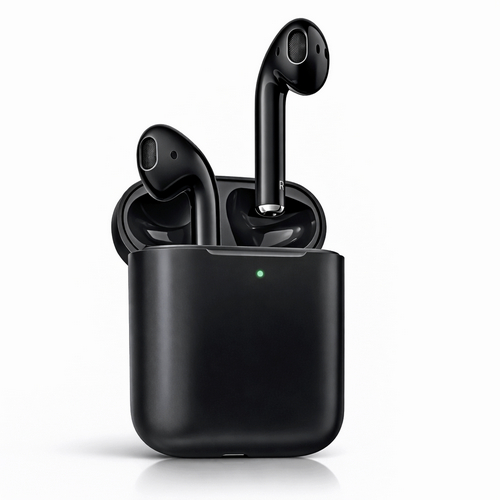
FaizFull F2 Earphones Frequently Asked Questions
FaizFull F2 Wireless Earphones User Reviews ›››
FaizFull F2 Technical Specifications
- Model: FaizFull F2
- Color: white
- Earphone type: in-ear; sealed; wireless
- Connection type: Bluetooth 5.0
- Protection rating: IPX4
- Charging time: 2 - 3 hours
- Wireless range: 10 - 15 m
- Minimum frequency response: 20 Hz
- Maximum frequency response: 20000 Hz
- Housing material: plastic
- Acoustic design: closed
- Attachment type: in the outer ear
- Additional functions: integrated microphone; touch controls; Siri and Google support
- Compatibility: iPhone; Android; iOS; Samsung; Honor; Xiaomi; Huawei; tablets; laptops; all Bluetooth devices
- Country of manufacture: China
- Package contents: 2 earphones; charging case; USB cable; instructions; box
- Weight without packaging: 230 g
- Weight with packaging: 235 g
- Package dimensions: 11 x 11 x 4 cm
Technical Specifications
What Bluetooth version do FaizFull F2 earphones use?
The earphones support Bluetooth 5.0 and above.
What is the Bluetooth range?
Wireless connection range is approximately 10–15 m, depending on operating conditions.
What is the audio latency?
Audio transmission latency is approximately 10–30 ms, depending on the smartphone model and connection conditions.
How long do the earphones operate without recharging?
Different sources give battery life values of up to 6 hours and up to 6–7 hours of continuous playback. Total time with case recharging is up to 24 hours.
What is the battery capacity?
Case battery capacity is 300 mA·h. Each earphone battery capacity is 30 mA·h.
How long does charging take?
Initial charging takes approximately 1 hour. Normal charging of the set takes 30–40 minutes.
What charging connector is used?
Depending on the version: model 317569899 uses Lightning; models 317560929, 693644221 and 609761259 use Type-C.
Is wireless charging supported?
Models 693644221 and 609761259 support wireless charging. Model 317569899 does not support wireless charging.
Is water protection provided?
The protection rating is IPX4, providing water splash protection. Use in light rain is permitted. Water immersion is not recommended.
.Compatibility and Connection
Are the earphones suitable for iPhone, Android, tablets, PCs or Smart TVs?
The earphones are compatible with any device featuring Bluetooth 5.0 or above.
What name appears in the Bluetooth list?
Depending on the version, the device may appear as FAIZ PRO, FAIZ 84 or FAIZ 2.
Is automatic connection provided?
After initial pairing, the earphones connect automatically when the case opens.
How are the earphones connected?
Open the case lid, enable Bluetooth on the device and select the earphones from the available device list. Restart the phone if necessary.
Is a mobile app available?
There is no dedicated manufacturer app. Controls use the device's standard Bluetooth settings.
Is Find My supported?
On iPhone, the integrated Find My app can be used. Android can use third party apps.
Is an iPhone connection animation provided?
A connection animation is not supported.
Controls and Functions
How do touch controls work?
1 touch pauses or plays; 2 touches select the next track; holding activates the voice assistant or changes noise cancellation modes; swiping up/down adjusts volume.
Can volume be adjusted from the earphones?
Volume adjustment is available on models 317560929, 693644221 and 609761259 by swiping up or down on the sensor.
Is noise cancellation provided?
Depending on the version: model 317569899 has no noise cancellation; model 317560929 has passive noise cancellation; models 693644221 and 609761259 have active noise cancellation (ANC) and transparency mode.
How is noise cancellation enabled or disabled?
Hold the sensor for 3 seconds to change modes. Different sources specify holding for 3–4 seconds.
Can the voice assistant be disabled?
Disable it through device settings for Siri, Voice Control or Google Assistant.
Can the ear detection sensor be disabled?
The function can be disabled in Bluetooth settings if supported by the corresponding model version.
.Charging and Indication
Can a 33 W or 80 W power adapter be used?
Standard medium and high power charging adapters, including 33 W and 80 W, may be used.
How can a full earphone charge be recognized?
Information appears through the case indicator, with green indicating full charge, or in the connected device Bluetooth section.
What do the case indicator colors mean?
Red indicates low charge, approximately 20–30%. Green indicates full charge.
Do the earphones have indicator lights?
The earphones themselves have no indicator lights.
Is there a sound when the case opens?
An audible signal occurs during initial connection or if the earphones are not connected to a device. After connection, the signal stops automatically.
Can the charging sound be disabled?
Disabling the audible signal when charging starts is not provided.
Operation and Use
Are the earphones suitable for games?
With latency of 10–30 ms, the earphones are suitable for mobile games.
Will other people hear the music?
At volume levels up to approximately 80%, sound is practically inaudible to others.
Are they suitable for conversations and message recording?
The earphones feature a sensitive microphone and are suitable for phone conversations and voice messages. Call quality depends on Bluetooth signal strength and ambient noise.
How many ear tips are included?
The package includes 3 pairs of replacement ear tips, with one pair installed on the earphones.
How are the ear tips replaced?
Hold the earphone and carefully remove the ear tip, then fit the new tip until secured.
What covers are suitable?
Model 317569899 is compatible with AirPods 1/2 covers. Models 317560929, 693644221 and 609761259 are compatible with AirPods Pro and Pro 2 covers.
.Problem Situations
What should be done if the earphones do not connect or only one works?
Perform a reset: remove the device from the Bluetooth list; place both earphones in the case and close the lid; hold the rear case button for 20 seconds; reconnect.
Why does audio cut out?
Bluetooth signal interference is possible. Perform a full reset according to the instructions above.
Additional Information
Is a warranty provided?
The warranty period is 1 year for manufacturing defects.
Can the device be checked upon receipt?
It can be checked at the collection point upon receipt.
What cable is included?
A silicone cable is included.
Numerical Specification Summary
Bluetooth: 5.0 and above; range: 10–15 m; latency: 10–30 ms; battery operation: 6 hours or 6–7 hours; total time with case: up to 24 hours; case capacity: 300 mA·h; earphone capacity: 30 mA·h; charging: 30–40 minutes; initial charging: approximately 1 hour; sensor hold: 3 seconds or 3–4 seconds; low charge: 20–30%.
Related articles:
IOTO Buds 2 Wireless Earphones FAQ
Xiaomi Redmi Buds 6 Play Wireless Earphones FAQ
JBL Tour Pro 5 FAQ: Wireless Earphones with a Case Display
CAT ear STN-28 Cat Ear Headphones FAQ
HUAWEI FreeBuds 5i Earphones FAQ
HUAWEI FreeBuds SE 2 FAQ
KABIX U5 Earphones FAQ (Frequently Asked Questions)
Kabix B20 Bluetooth Headset FAQ
A8Pro Wireless Earphones FAQ
| Mi Sports Bluetooth Manual |
| Xiaomi MI True Wireless Basic Manual |
| Xiaomi Redmi Buds 4 Instructions |
| JBL WAVE FLEX Earbuds Manual |
| HONOR Choice EarBuds X5 Headphones User Manual |
| Realme Buds T110 Manual |