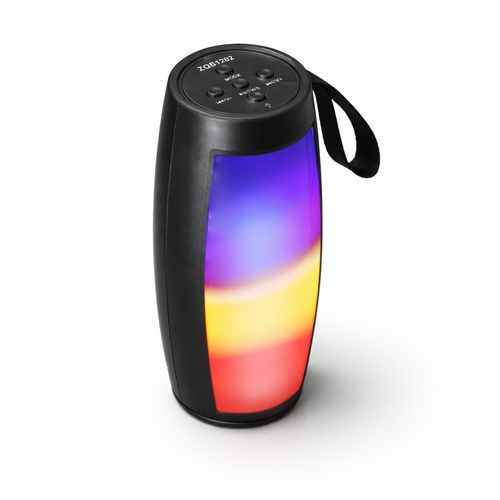
ZQS-1202 Wireless Bluetooth Speaker Operating Manual
Package Contents
- Speaker
- Cable
- Original packaging
- Operating manual
ZQS-1202 Portable Wireless Bluetooth Speaker Specifications
Type: wireless speaker
Model: ZQS-1202
Audio configuration: mono
Stereo sound: yes
Wireless interfaces: Bluetooth
Bluetooth module: 2.0
Input interfaces: USB Type-C, USB, microUSB, SIM card slot
Output interfaces: USB
Memory card support: yes
MicroSD slot: yes
FM radio: yes
Microphone: yes
Lighting: yes
Water resistance: yes
Main housing material: plastic
Minimum frequency: 70 Hz
Maximum frequency: 20000 Hz
Sensitivity: 42 dB
Number of speaker drivers: 3
Battery capacity: 1200 mAh
Battery life: up to 5 h
Battery charging time: 120 min
Can charge other devices: yes
Dimensions: 150 x 61 mm
Weight: 240 g
Color: black
Warranty period: 14 days
Country of manufacture: China
Functions and Controls
1. (DC 5V) Charging port for the built-in battery. The LED lights when you connect a DC 5V cable.
2. (ON/OFF) Turn left to switch the speaker off or right to switch it on.
3. (U Disk Port) Insert a USB drive to play MP3 and WAV files.
4. (CARD Port) Insert a memory card to play MP3 and WAV files.
5. (MODE) Briefly press to switch between T, CARD and U disk modes.
6. (P/P/TWS) Briefly press to play or pause. In FM mode, hold to search for stations automatically.
7. Double-press to link the primary speaker to a secondary speaker. Hold P/P on the secondary speaker to disconnect it from the primary speaker. Hold P/P on the primary speaker to disconnect both secondary speakers and the mobile phone.
8. (PREV) In T, CARD and U disk modes, press to skip to the previous track. In FM mode, press to select the previous station. Hold to reduce the volume.
9. (NEXT) In T, CARD and U disk modes, press to skip to the next track. In FM mode, press to select the next station. Hold to increase the volume.
10. Briefly press to cycle through lighting modes or switch the light on or off.
11. (Bluetooth Connection) Pairing via Bluetooth.
- Switch on the speaker or press MODE to enter Bluetooth mode.
- Open the Bluetooth settings on your device (phone, computer or other equipment) and search for Bluetooth devices. Select SY-SPEAKER when it appears.
- After the first successful pairing, the speaker reconnects automatically in approximately 10 seconds the next time. Each speaker can connect to only one Bluetooth device.
FCC Statement
1. This device complies with Part 15 of the FCC Rules. Operation is subject to the following two conditions:
1) This device may not cause harmful interference.
2) This device must accept any interference received, including interference that may cause undesired operation.
2. Changes or modifications that the party responsible for compliance has not expressly approved may void the user's authority to operate the equipment.
(!) NOTE: This equipment has been tested and found to comply with the limits for a Class B digital device under Part 15 of the FCC Rules. These limits provide reasonable protection against harmful interference in residential installations. This equipment generates, uses and can radiate radio frequency energy. If installed or used contrary to the instructions, it may cause harmful interference to radio communications. Interference may still occur in a particular installation.
If this equipment causes harmful interference to radio or television reception, as determined by switching it off and on, try one or more of the following measures:
- reorient or relocate the receiving antenna;
- increase the distance between the equipment and receiver;
- connect the equipment to an outlet on a different circuit from the one that supplies the receiver;
- consult the seller or an experienced radio and television technician for assistance.
RF warning statement
The device was evaluated for compliance with general RF exposure requirements. It can be used in portable exposure conditions without restrictions.
Related Articles:
ZQS-1202 FAQ
ZQS-1202 Portable Bluetooth Speaker Review
| JBL Charge 3 User Manual |
| Portable BT Speaker TG157 Instructions |
| JBL FLIP 6 User Manual |
| ZQS 4239 Instructions |
| Smart Light Sound Machine BT 3401 User Manual |
| GT 112 Portable Speaker User Manual |